Custom Search
Showing posts with label PC Tricks. Show all posts

Friday, 31 August 2012

Windows 8 tricks

Disable the Lock ScreenWindows 8 shows a lock screen when you restart your computer,log out, or lock it. Its very pretty, but it just adds one more keystroke to the login process. You can actually disable the lock screen entirely, although Microsoft hides his option very well.

This option is located in the Group Policy Editor. To launch it, type gpedit.msc at the Start screen and press Enter.

In the Group Policy Editor, navigate to Computer Configuration\Administrative Templates\Control Panel\Personalization.

Double-click the Do not display the lock screen option, set it to Enabled, and click OK.

The next time you restart your system, log out, or lock the screen, you'll see the login screen instead of the lock screen. 


Display Administrative Tools
By default, Windows hides the Event Viewer, Computer Management and other Administrative Tools from the Start screen. If you use these applications frequently, you can easily unhide them.
From the Start screen, mouse over to the bottom or top right corner of the screen and click the Settings charm.

You can also press WinKey-C to view the charms.

Click the Setting link under Start and set the Show administrative tools slider to Yes.

The Administrative Tools will appear on the Start screen and inthe All Apps list.
screen.


Customize Search ApplicationsMetro apps can appear as options when you use the searchfeature.
You can control the apps that appear here and trim down the list. First, click the Settings charm from anywhere on your system and click the More PC settings link.
From the PC settings screen, click the Search category and use the sliders to hide apps from the search screen.
Read more

Saturday, 7 July 2012

Top Sites For Serial Keys


Today there are many people out there who still prefer to use pirated software. It's especially common among users who live outside the U.S. When you download your program or game you might need the serial to remove the trial period. Blindly searching the web for cracks and keys is about as smart as using Limewire to search for antivirus software – something not well-advised. Undoubtedly and unfortunately, the number of crack sites with overtones of a malicious agenda heavily outweigh sites that just want to serve up the honest goods. Having said that, there actually are quite a few creditable 'crack' sites that won't try to bombard you with full-screen popup ads, or commandeer your computer into a spam-loving Kraken or Srizbi Botnet army. Here i want to present you a list of "clean" crack sites for all the latest warez to unlock your software.
Please note that the site reviews herein only include information about each site, not the contents of the 'cracks' themselves. Always use a reputable antivirus and antispyware program on cracks & keys before using them.


Here is my list of Safe and Malicious Crack/KeyGen Sites:

www.key.in

www.smartserials.com

www.keyguru.com - Popular site with hundreds of thousands of results.

www.serialkey.net

www.zcrack.com

www.subserials.net

www.serialportal.com

supercracks.net

www.serialcrackz.com

www.serials.be

www.cracktop.com

www.cracksfm.com

www.cracklib.net

www.crackdb.org - The site itself is safe, however; many affiliate links are on the 'do-not-visit' list. When searching, skip past the first results (with the prices).

www.theserials.com
Read more

Friday, 6 July 2012

Magic Tricks in Microsoft Windows

Here Are Some Funny And Magical Tricks For Your PC Just Try It.... 


Magic Trick 
An Indian found that nobody can create a FOLDER anywhere on the Computer which can be named as CON This is something funny and inexplicable? At Microsoft the whole Team, couldn't answer whythis happened! TRY IT NOW, IT WILL NOT CREATE A FOLDER
------------------------------------------


Magic Trick 
For those of you using Windows, do the following:
1.) Open an empty notepad file
2.) Type Bush hid the facts (without the quotes)
3.) Save it as whatever you want.
4.) Close it, and re-open it.
Noticed the weird bug? No one can explain!
------------------------------------------


Magic Trick 
Again this is something funny andcan't be explained? At Microsoft the whole Team, including Bill Gates, couldn't answer why this happened!
It was discovered by a Brazilian. Try it out yourself?
Open Microsoft Word and type=rand (200, 99)
And then press ENTER And see the magic?..!
------------------------------------------


Magic Trick 
Did you know that a flight numberfrom one of the planes that hit one of the two WTC towers on 9/11 was Q33N. In Notepad / WordPad or MS Word, type that flight number i.e Q33N. Increase the font size to 72. Change the font to Wingdings.
u will be amazed by the findings!!
Read more

How To Hack FireFox To Autosave Passwords

Here is a short tutorial on
how to get firefox to save
usernames + passwords
automatically with any
notifications (Sort of like a
keylogger) just by editing 1
of the files.
ideal if you want to get
someones login details who
uses your computer.
:t :dance :dance
1) First you need to close
firefox.

2) Now locate the nsloginmanagerprompter.js
which is normally found in
C:ProgramFiles
MozillaFirefoxComponents

3) Open
nsloginmanagerprompter.js
with notepad ++

4) Replace the entireentire line 804
to 869 with the following code
var pwmgr = this._pwmgr;
pwmgr.addLogin(aLogin);
When you''ve done that
"save as" to your desktop,
then drag back in to the
original folder and replace
the file.
Now your done go into
firefox and try it out..Smile
To see the usernames +
passwords you need to click
on tools at the toptop ofof your
browser and go to pagepage info
then security.
They will be saved into the
saved passwords section.
Enjoy
Read more

How To Set Picture Password For Windows 8

Hi friends! You all know that Windows 8 is going to come with its many of the awesome apps. One of its awesome apps is its picture password. It can be used to fully protect your PC without any fear of cracking your password. When you are using picture password, the image which you have selected will appear after booting your window. You have to drag your cursor in that way three times which you have set as password. Without matching all three innings, your PC will not log on. Isn't it interesting? So, come on let’s do it.


Follow these steps to set your picture password—

(Note:— You can directly go to the control panel in the start button and skip the First and Second step.)

1. Go to the ‘Control Panel’, and click on the ‘User Accounts and Family Safety’.


2. Now, go to the ‘User accounts’ and click on ‘Make changes to my account in the Settings App’.

3. Click on the ‘Users’ on the left pane and click on ‘create a picture password’ below the ‘Picture password’.

4. It will ask your current password if created, provide your current password and press ‘OK’.

5. Now, click on ‘Choose picture’.

6. Select the picture you want to set as your password and press ‘Open’.

7. For your confirmation, it will ask again that choose this picture or any other. So, click on ‘Use this picture’.

8. Now, it will ask you the method in which way you want to set. There are three ways to set as password, choose one of them and repeat it three times.

9. Then again, for your sake it will ask to repeat your way to set as password, repeat the same act which you have chosen as password.


10. Finally, click on ‘OK’ and your password has been created.
Read more

Sunday, 24 June 2012

Sites For Getting Live Cricket Scores

Live Cricket Scores,Info Sites


http://www.cricketweb.net/

http://www.ecb.co.uk/

http://icc-cricket.yahoo.net/

http://www.crichotline.com/

http://www.cricket.co.uk/

http://www.action8cricket.com/

http://www.lords.org/

http://espn.go.com/

http://www.cricket365.com/

http://www.cricpoint.com/

http://www.cricket.com.au/

http://scores.sify.com/index.shtml

http://www.planetcricket.net/

http://www.cricschedule.com/

http://www.windiescricket.com/

http://www.smh.com.au/sport/ cricket/

http://cricket.expressindia.com/

http://cricket.yahoo.com/

http://www.cricketarchive.com/

http://www.cricketnirvana.com/

http://cricfire.com/

http://www.lccc.co.uk/

http://www.owzat-cricket.co.uk/

http://webcric.com/

http://www.tnlcricket.com/

http://www.reigatepriorycc.co.uk/

http://cricket.123india.com/

http://www.cricketlivelinks.com/

http://www.governor.co.nz/

http://www.iplt20.com/index.html

http://www.cricket-blog.com/ index.php

http://www.pcboard.com.pk/

http://www.caribbeancricket.com/

http://blogs.abc.net.au/ grandstand/cricket/

http://khantv.com/

http://extracover.net/

http://www.bcci.tv/

http://www.indiancricketfans.com/

http://www.espncricinfo.com/

http://ads.cricbuzz.com/
Read more

Saturday, 26 May 2012

How to remove viruses completely from usb

There are some common virus that can spread and infect your computer through USB drives. These viruses include ‘Ravmon‘, ‘New Folder.exe‘, ‘Orkut is banned‘ and some other common viruses. Most antivirus either do not detect these viruses or do not remove them (just quarantine them).
Steps ----
- When you connect USB with your computer, you will get a window asking you what to do. Choose ‘Cancel‘ here.
- Open command prompt by typing ‘cmd‘ in Run box (from Star+Run). In the command prompt, write ‘drive letter:‘ and press Enter (let us say your USB is E so you will write E.

- Now type ‘dir /w/a‘ and press Enter.

- This will display a list of files in your flash drive, check if these files are there or not
Autorun.inf
Ravmon.exe
New Folder.exe
svchost.exe
Heap41a  Or any other exe file which may be suspicious.
- If any of the above file is there, that means USB is infected by viruses.
- Type ‘attrib -r -a -s -h *.*‘ in command prompt and press Enter. This will remove the Read Only, Archive, System and hidden file attribute from all the files.
- Now just delete the files using the command ‘del filename‘ (for example, to delete a file with name abc.exe I will use ‘del abc.exe‘).
- Your USB now does not have any suspicious file in it. To be on safe side you can now check it with any antivirus to see if it has any such file.
-------The end------
Note:- Disable the Auto-play feature of USB drives so that there are almost no chance of virus spread. Tweak UI can do it for you , download Tweak UI software and install it. Run the program and disable the Auto-run feature of USB drives.
Read more

Friday, 25 May 2012

Tips to browse fast on slow internet conections

Read carefully each n every step


You should consider yourself lucky if you live in the Developed countries, because you get to enjoy the internet speed of 8Mbps or 2Mbps at least. But there are still few parts of the world there the internet 256kbps is called a broadband connection. But for any reason you still use a low speed internet connection, this post might help you if you want to browse internet on your PC by consuming less bandwidth.

Google Reader
Google reader is a feed reader from Google which grabs the content from blogs you subscribe to, at one place so that you can read your favorite blogs at one place without actually downloading extra files of the blog theme. And the best part is, it works on extremely slow connection and consumes super less data.

Use Opera Browser
Opera is just like any other browser but it has got a great feature which is perfect when you are on a slow internet connection and care to save bandwidth. The feature is calledOpera turbo, when it is turned on, the websites you browse is downloaded at the servers of Opera first and the data is compressed there before it loads on your browser which makes it easy to load the pages and consumes less data. There is another option to turn the images off.

Use Mobile Version of Websites
If sites like Facebook take a lot of time to load, you can even try m.facebook.com ortouch.facebook.com. You will not be able to use all the features but it?s worth using when the main website fails to load use to less speed of internet.

Stop Automatic Updates of Windows and Other programs
There are planets of things that run in the background and try to connect with the internet whenever the connection is available. Turn off the automatic updates of your windows and use a firewall to block all other programs from connecting to the internet if they are not much important.
Read more

Thursday, 24 May 2012

Reset windows7 / vista password

If somehow you have forgotten your windows password and are looking for way around to login back into your computer then you won’t have to worry. There are many methods are available for resetting password of your windows 7 or vista. But many of them are lengthy or sophisticated.

This is one of the simplest method and you only need a windows installation CD/USB to reset the password. It relies on an unpatched bug in windows operating system.


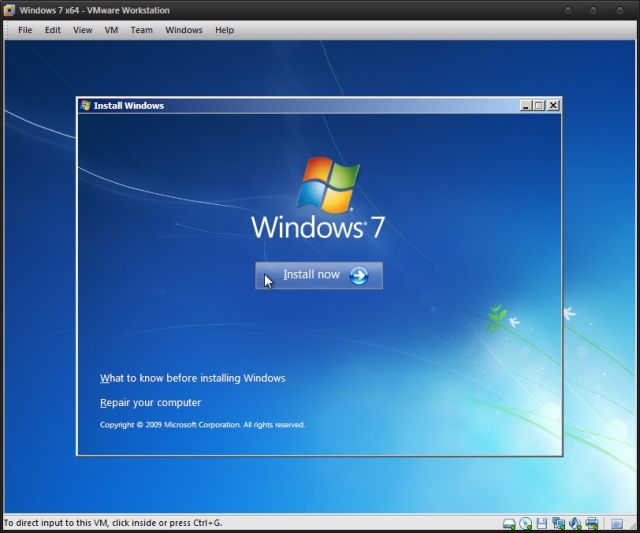
Insert windows 7 disk into your CD Rom and Restart your computer.
* Press any key to Boot from the CD and then click on Repair your Computer.


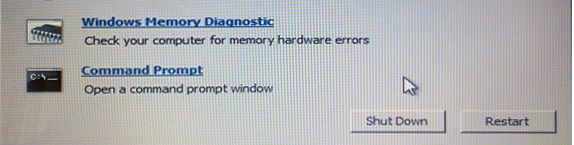
Now from the various options select Command Prompt.


Now Command Prompt will be open and create a backup of Sticky keys by typing the following command in the command prompt


copy c:\windows\system32\sethc.exe c:\


Now replace sticky keys with the Command Prompt by typing the following command.


copy c:\windows\system32\cmd.exe c:\windows\system32\sethc.exe


Now Restart your computer.

When you get the windows login screen then hit Shift button for 5 times continuously and Administrative Mode of Command Prompt will be open.

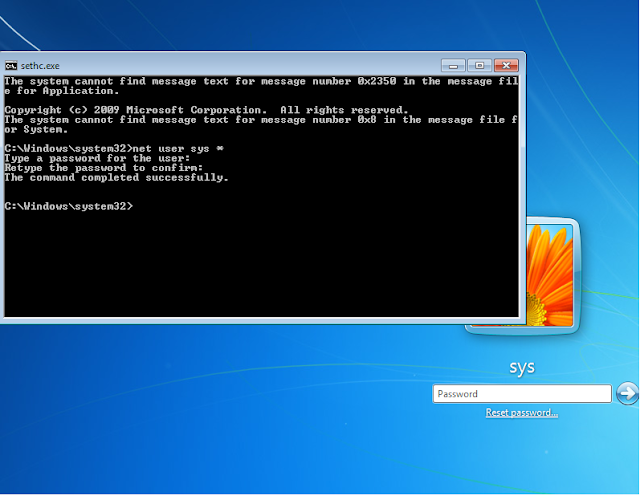
Now to reset the password just type the following command


net user sys *

Remember: sys is the username of the compute. Replace sys with the username of your computer


Login in your computer system with your new Username and Password.


Now every time when you press Shift key for 5 times then command prompt will be open instead of Sticky keys. To get back these Sticky keys repeat first three steps and then in the command prompt window type the following command.


copy c:\sethc.exe c:\windows\system32\sethc.exe


Try Yourself And Please Reply
Read more

Tuesday, 22 May 2012

Rename multiple files at once


Rename Multiple Files at Once

Did you know that you can re-name multiple files at once?

It’s possible! So next time you have a bunch of files, folders, or pictures with names like DSC_5678 and want to rename them in a more uniform way, do this:

Highlight all the files/folder in question…


Right-click, choose Rename and call it something that best describes them. For example, I had a bunch of pictures of a guitar, so I just renamed it “Guitar”.

Voila! A uniform naming convention!

Read more

Monday, 21 May 2012

10 Cool Windows Shortcuts You Need to Know


here’s a list of really cool and useful shortcuts that you could use on your PC.

....
1- Alt + Tab - Switch between apps.

2- Shift + CTRL + N - Create New Folder

3- Shift + Delete - Permanent delete file

4- Windows key + E - Open My Computer.

5- Alt + F6 - Switch between apps.

6- Windows + Spacebar - Show Desktop

7- Windows + 1, 2, 3,.. Launch Pinned Apps.

8- Windows + L -
Lock your computer in a tick.

9- Windows + (+/-) - Zoom in/out

10- Alt + Spacebar + N -Minimize Active Window
Read more

Friday, 11 May 2012

How to control mouse pointer using keyboard

We can control the mouse using keyboard,It is very useful when your mouse is malfunctioning.
The keyboard mouse can perform all tasks same as like normal mouse.

Follow the given steps to activate the keyboard mouse:

1.To edit this feature, first you should log ontoyour computer withadministrative rights.
2.To activate this feature,press Alt+Shift+NumLock keys
at once and you will receive a small MouseKey box.
3.To keep MouseKeys on, click on Ok button or click on cancel button tocancel MouseKeys box.
Click on Settings button,if you want to adjust the mouse cursordetail settings.

Use numeric keys to control mouse cursor.
Read more

How to super hide folders using command prompt without any softwares

We can hide any folders using CMD. Also no one can see it eventhough if we enable to show all the hidden files. 
So here's the tuturial on how to do it:

1. First of all create a folder
2. Go to command prompt
3. To hide the file here is the code type in the cmd:

Code:
attrib +s +h "Full path of folder"
[Eg:if you want to hide the folder named "hai" in C drive,Type in CMD as
  attrib +s +h "c:\hai" ]

4. Now the file is hidden . Even if you enable to show the hidden files and folder from Folder option the file will be hidden.
5. To reveal the hidden file here is the code type in the cmd:

Code:
attrib -s -h "Full path of folder"
[Eg:attrib -s -h "c:\hai" ]
Now you superhide your folder.
Read more

Thursday, 10 May 2012

Free SmS sending Websites

LIST OF FREE SMS SITES:
these are the sites in which we can send free sms

http://www.gsmvault.com/
http://smscity.com/
http://www.sms2india.org/
http://www.freesms.web.tr.tc/
http://www.d1g.com/
http://thesmszone.com/
http://zyb.com/
http://www.vazu.com/
http://www.sms.ac/
http://www.agentsms.com/
http://www.mobizone.com/
http://www.yellowpages.com.eg/
http://www.shortmessage.com/
http://www.worldxs.net/sms.html
http://www.hot.it/sms
http://www.smspress.com/
http://www.freesms.com/
http://www.textmefree.com/
http://www.rosms.home.ro/
http://www.nice-prizes.de/
http://www.uni.de/
http://www.quicksms.de/
http://www.cbfsms.com/
http://www.sms.de/
http://www.send.sms.to/free.asp
http://www.genie.co.uk/
http://www.world-free.com/free-sms
http://www.aircall.ch/sms/sendmsg_main_free.asp
www.telefonmarkt.de/sms/sms_info.php
http://www.free-sms-service.de/
http://www.freesms.2way.de/
www.bestspider.com/sms
http://www.metacrawler.de/
www.jokes.gr/en/sms
www.call-magazine.de/free_sms
http://www.vizzavi.it/
www.uboot.com/uk
www.ournet.md/sms
http://www.freesms.co.za/
http://www.hotsms.com/
http://www.jfax.de/
http://www.smsfree.co.uk/
www.mobileedge.co.uk/freesms/freesms.htm
http://www.sms-sprueche.tv/
http://www.sms.mums.it/
http://www.smspup.com/
www.jump.to/freesms
http://www.awalsms.com/
http://www.uaesms.com/
www.jinny.com.lb/sms
www.cellular.co.za/send_sms2.htm
www.mobizone.com/
http://www.smspop.com/
http://www.nemra1.com/
http://www.boswtol.com/
http://free-sms-message.com/index.htm
http://adleel.com/sms.htm
http://www.itsalat.com/
http://www.quios.com/
http://www.clickatell.com/
www.ulluminati.ch/Nexus/sms.html
http://www.freesms.net/
http://www.free-sms.com/
http://www.lycos.co.uk/
http://www.sms.at/
http://www.smsyes.com/
www.smsuae.com/sms-uae
http://www.edihasms.com/
www.worldxs.net/sms.html
www.hot.it/sms
http://www.smspress.com/
http://www.freesms.com/
http://www.textmefree.com/
http://www.rosms.home.ro/
http://www.nice-prizes.de/
http://www.uni.de/
http://www.quicksms.de/
http://www.cbfsms.com/
http://www.sms.de/
www.send.sms.to/free.asp
http://www.genie.co.uk/
www.world-free.com/free-sms
www.aircall.ch/sms/
sendmsg_main_free.asp
www.telefonmarkt.de/sms/
sms_info.php
www.bestspider.com/sms
www.jokes.gr/en/sms
www.call-magazine.de/free_sms
http://www.vizzavi.it/
www.uboot.com/uk
www.ournet.md/sms
http://www.cellular.co.za/
http://www.freesms.co.za/
http://www.hotsms.com/
http://www.jfax.de/
http://www.smsfree.co.uk/
www.mobileedge.co.uk/freesms/freesms.htm
http://www.sms-sprueche.tv/
http://www.sms.mums.it/
http://www.smspup.com/
www.jump.to/freesms
http://www.awalsms.com/
www.jinny.com.lb/sms
www.cellular.co.za/send_sms2.htm
http://www.boswtol.com/
www.masrawy.com/sms
http://www.resalh.com/
http://free-sms-message.com/index.htm
http://adleel.com/sms.htm
http://mobile.fares.net/sms/uae
http://www.itsalat.com/
http://www.quios.com/
http://www.clickatell.com/
www.ulluminati.ch/Nexus/sms.html
http://www.freesms.net/
http://www.free-sms.com/
http://www.lycos.co.uk/
http://www.sms.at/
http://www.sms.com/
http://www.smsyes.com/
www.smsuae.com/sms-uae
http://www.edihasms.com
Read more

How to use trial programs for ever [PC Trick]

In this post I’ll show you how to hack a Software and
run the trial program forever.

Most of us are familiar with many softwares
that run only for a specified period of time in the trial mode.Once the trial period is
expired these softwares stop functioning and demand for a purchase.But there is a way to run the softwares and make them function beyond the trial period.Isn’t this interesting? Before I tell you how to hack the software and make it run in the trial mode forever,we have to understand the functioning of these softwares.I’ll try to explain this in brief.When these softwares are installed for the first time, they make an entry into the Windows Registry with the details such as Installed Date and Time, installed path etc.After installation every time you run the software, it compares the current system date and time with the installed date and time.So, with this it can make out whether the trial period is expired or not.So with this being the case, just manually changing the system date to an earlier date will not solve the problem.For this purpose there is a small Tool known as RunAsDate.


RunAsDate is a small utility that allows you to run a program in the
date and time that you specify. This utility doesn’t change the current system date,but it only injects the date/time that you specify into the desired application.
RunAsDate intercepts the kernel API calls that returns the current date
and time (GetSystemTime, GetLocalTime, GetSystemTimeAsFileTime), and
replaces the current date/time with the date/time that you specify.It works with
Windows 2000, XP, 2003 and Vista.


NOTE: FOLLOW THESE TIPS CAREFULLY


You have to follow these tips carefully to successfully hack a software and
make it run in it’s trial mode forever.


1. Note down the date and time,when you install the software for the first time.
2. Once the trial period expires,you must always run the software using RunAsDate.
3. After the trial period is expired, do not run the software(program) directly.If you run the software directly even once, this hack may no longer work.
4.It is better and safe to inject the date of the last day in the trial period.
For example, if the trial period expires on jan 30 2009, always inject the date as jan 29 2009 in the RunAsDate.
Thats it. 

Mediafire Link:
http://www.mediafire.com/?7icx2ikm5bpdhgc
Read more

LinkWithin

Related Posts Plugin for WordPress, Blogger...